[TIL/React] 2024/09/05
✅ API Reference - useMutation 일단 useMutation이 왜 만들어졌는지 알아야 하는데, API Reference에는 해당 내용이 없다. Guides & Concepts의 Mutation 파트에서 해답을 찾을 수 있었다. useQuery가
✅ API Reference - useMutation
일단 useMutation이 왜 만들어졌는지 알아야 하는데, API Reference에는 해당 내용이 없다.
Guides & Concepts의 Mutation 파트에서 해답을 찾을 수 있었다.

useQuery가 서버 데이터를 fetch하기 위해 주로 사용되는 것과는 다르게, useMutation은 서버 데이터를 create/update/delete할 때 사용되거나 server side-effect를 처리하는 데 사용된다고 한다. 말 그대로 Mutation을 위해 사용하는 훅이다.
기본 형태 ✍️
const {
  data,
  error,
  isError,
  isIdle,
  isPending,
  isPaused,
  isSuccess,
  failureCount,
  failureReason,
  mutate,
  mutateAsync,
  reset,
  status,
  submittedAt,
  variables,
} = useMutation({
  mutationFn,
  gcTime,
  meta,
  mutationKey,
  networkMode,
  onError,
  onMutate,
  onSettled,
  onSuccess,
  retry,
  retryDelay,
  scope,
  throwOnError,
})

mutate(variables, {
  onError,
  onSettled,
  onSuccess,
})
Options ✍️
1. ``mutationFn``: Required, 실제로 서버와의 비동기 작업(create/update/delete)을 처리하는 함수. Promise를 반환해야 한다. variables는 mutate 함수가 mutationFn에 전달하는 객체
2. ``gcTime``: 캐시 데이터가 메모리에 남아있는 시간(밀리초 단위), 캐시 데이터가 메모리에 유지되는 시간을 정의하고, 해당 시간이 지나면 garbage collection을 통해 메모리에서 제거된다. 서로 다른 캐시 시간이 지정된 경우 가장 긴 시간이 적용되며, Infinity로 설정하면 garbage collecting이 비활성화 된다.
3. ``mutationKey``: 특정 mutation을 식별하기 위해 사용하는 값. mutationKey를 통해 queryClient.setMutationDefaults로 기본값을 설정하여, 관련 Mutaion을 그룹화하거나 설정을 공유할 수 있다.
4. ``networkMode``: 네트워크 모드를 설정하는 옵션. 기본 값은 online. 네트워크가 online일 때에만 요청을 수행하겠다는 의미. always와 offlineFirst도 있다.
5. ``onMutate``: mutationFn이 실행되기 전에 호출되는 콜백 함수. optimistic updates를 수행하는데 유용하고, onMutate의 return 값은 mutation 실패 시 onError와 onSettled 함수에 전달된다. optimistic update는 서버와의 네트워크 지연이 UI 응답 속도에 영향을 미치지 않도록 하기 위해 고안된 개념이다. 사용자 경험을 개선하기 위함이 주 목적이라는 것을 알고 있자!
6. ``onSuccess``: mutation이 성공적으로 완료되었을 때 호출되는 함수. mutation의 결과 데이터를 처리하는 데 사용된다. 이후 비동기 작업을 처리하면 된다.
7. ``onError``: mutation이 에러를 만났을 때 호출되는 함수. 나머지는 상동.
8. ``onSettled``: mutation이 성공적으로 완료되거나 에러가 발생했을 때 호출되는 함수. 즉, mutation의 최종 상태에 대한 추가적인 작업을 수행하기 위한 함수. 성공과 실패에 공통적으로 적용되는 후처리 작업을 수행해야 할 경우 사용.
9. ``retry``: 실패한 mutation이 자동으로 재시도할 횟수를 설정하는 데 사용되는 옵션. 가령, 네트워크 요청 실패 시 자동으로 재시도할 수 있다.
10. ``retryDelay``: mutation이 재시도될 때의 지연 시간을 설정할 수 있는 옵션. 네트워크 요청 실패 시 재시도 간의 지연 시간을 조절할 수 있다.
11. ``scope``: 동일한 id를 가진 모든 mutation들이 직렬로 실행되도록 설정할 수 있는 옵션. 직렬로 실행된다는 것은 순차척으로 처리된다는 것을 의미한다.
12. ``throwOnError:``: 오류가 발생했을 때의 처리 방식을 설정하는 옵션. mutation이 실패했을 때 오류를 어떻게 처리할지 정의하는데 사용된다. true로 설정하면 오류를 렌더링 단계에서 throw하여 가장 가까운 error boundary로 전파하고, false로 설정하면 error boundary로 전파하지 않고 상태로 변환한다. => 뭔솔?
13. ``meta``: mutation의 캐시 항목에 추가 정보를 저장할 수 있도록 해주는 선택적 설정. timestamp와 같은 meta data를 저장하기에 유용한 옵션
14. ``queryClient``: Provider로 설정하면 된다. 중요한 논점은 아니다.
Returns ✍️
1. ``mutate``: variables를 활용하여 mutation 작업을 트리거하는 함수. 선택적으로 onSuccess, onError, onSettled와 같은 콜백을 추가할 수 있다.
2. ``onSuccess``: mutation이 성공적으로 완료되었을 때 호출되는 함수. mutation의 결과 데이터와 변수, 컨텍스트가 전달됨.
3. ``onError``: mutation 중 오류가 발생했을 때 호출되는 함수. mutation의 오류 객체와 변수, 컨텍스트가 전달됨.
4. ``onSettled``: mutation이 성공적으로 완료되었거나 오류가 발생했을 때 호출되는 함수. 결과 데이터, 오류, 변수, 선택적으로 컨텍스트가 전달.
5. ``mutateAsync``: mutate와 유사하지만, 반환값으로 Promise를 제공하여 await를 사용할 수 있다.
6. ``isPaused``: mutation이 일시 중지된 상태인지 여부를 나타낸다. true일 경우 mutation이 일시 중지된 것.
7. ``reset``: mutation의 내부 상태를 초기 상태로 재설정하는 함수.
8. ``failureCount``: mutation이 실패한 횟수를 나타낸다. 실패할 때마다 증가하며, 성공할 경우 0으로 재설정된다.
9. ``failureReason``: mutation 재시도를 위한 실패 이유를 나타낸다. 성공할 경우 null로 재설정된다.
10. ``submittedAt``: mutation이 submit된 시점을 나타내는 타임스탬프. 기본값은 0.
11. ``variables``: mutationFn에 전달된 변수 객체. 기본값은 undefined.
예제 코드 ✍️
reference: https://tanstack.com/query/latest/docs/framework/react/guides/mutations
레퍼런스 예제 코드 확인
✅ API Reference - useIsFetching
useIsFetching은 optional hook으로, 애플리케이션 백그라운드에서 "loading 또는 fetching하고 있는" ``쿼리의 수``를 반환한다. 애플리케이션 전체에서 로딩 인디케이터를 표시하는 데 유용하다.
기본 형태 ✍️
import { useIsFetching } from '@tanstack/react-query'
// How many queries are fetching?
const isFetching = useIsFetching()
// How many queries matching the posts prefix are fetching?
const isFetchingPosts = useIsFetching({ queryKey: ['posts'] })
Options ✍️
1. ``filters``: 쿼리를 필터링하는 데 사용되는 옵션. 원하는 쿼리를 선택적으로 필터링할 수 있음.
2. ``queryClient``: queryClient임
Returns ✍️
1. ``isFetching`: 애플리케이션 백그라운드에서 "loading 또는 fetching하고 있는" `쿼리의 수``
예제 코드 ✍️
import React from "react";
import axios from "axios";
import { useQuery, useIsFetching } from "@tanstack/react-query";
import styled from "styled-components";

const Container = styled.div`
  font-family: Arial, sans-serif;
  padding: 20px;
  max-width: 600px;
  margin: 0 auto;
`;

const Heading = styled.h1`
  text-align: center;
  color: #333;
`;

const TodoList = styled.ul`
  list-style: none;
  padding: 0;
`;

const TodoItem = styled.li`
  padding: 10px;
  border-bottom: 1px solid #ddd;
  display: flex;
  justify-content: space-between;
  align-items: center;
`;

const LoadingIndicator = styled.div`
  text-align: center;
  font-size: 18px;
  color: #007bff;
  margin-top: 20px;
`;

const fetchTodos = async () => {
  const response = await axios.get(
    "https://jsonplaceholder.typicode.com/todos"
  );
  return response.data;
};

const TodoApp = () => {
  const {
    data: todos,
    isLoading,
    error,
  } = useQuery({
    queryKey: ["todos"],
    queryFn: fetchTodos,
  });

  const isFetching = useIsFetching({ queryKey: ["todos"] });

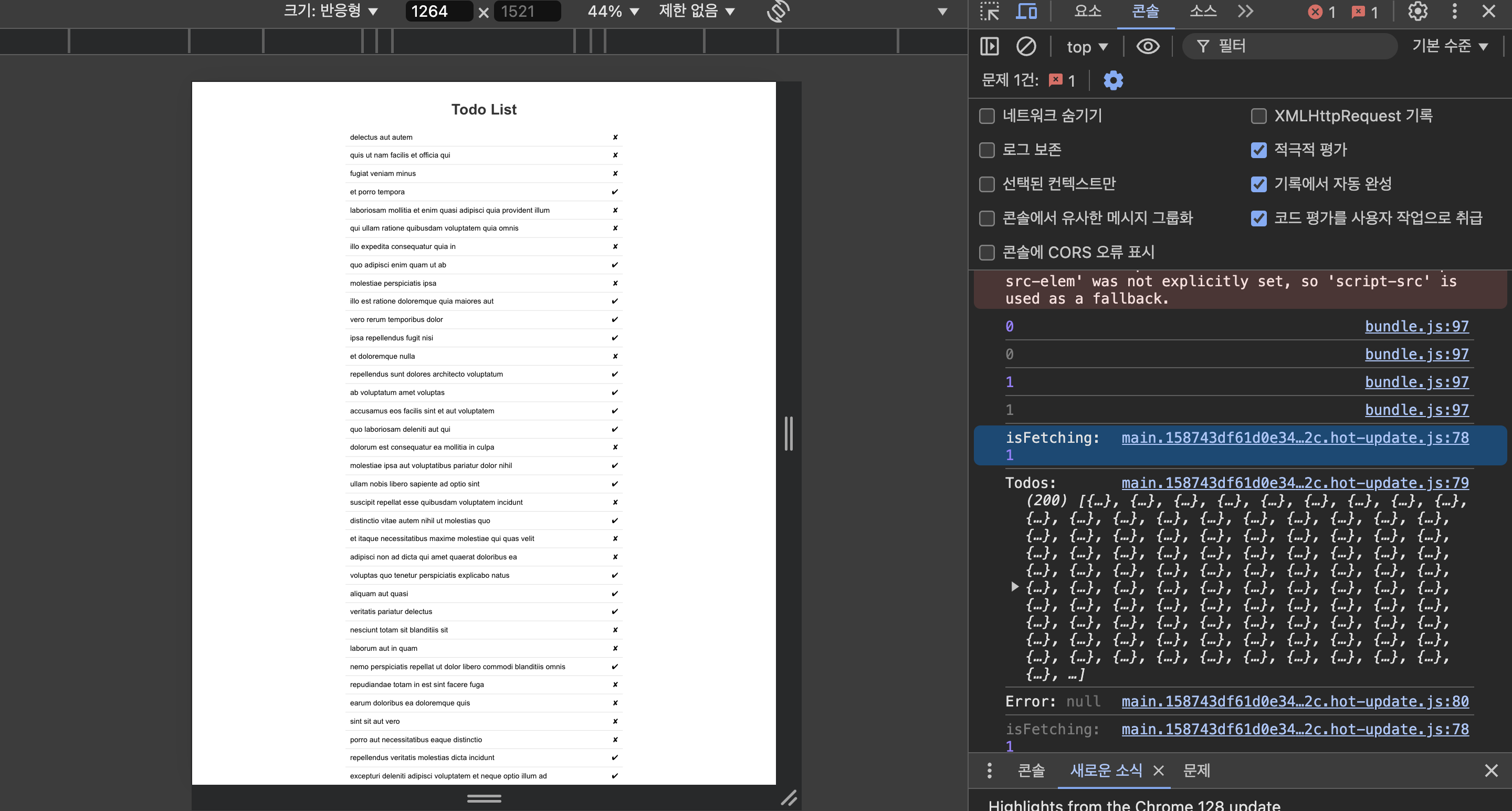
  console.log("isFetching:", isFetching);
  console.log("Todos:", todos);
  console.log("Error:", error);

  if (isLoading) return <p>Loading...</p>;
  if (error) return <p>Error fetching todos: {error.message}</p>;

  return (
    <Container>
      <Heading>Todo List</Heading>

      {isFetching > 0 && <LoadingIndicator>Fetching data...</LoadingIndicator>}

      <TodoList>
        {todos.map((todo) => (
          <TodoItem key={todo.id}>
            {todo.title}
            <span>{todo.completed ? "✔" : "✘"}</span>
          </TodoItem>
        ))}
      </TodoList>
    </Container>
  );
};

export default TodoApp;
import React from "react";
import axios from "axios";
import { useQueries, useIsFetching } from "@tanstack/react-query";
import styled from "styled-components";

// Styled Components
const Container = styled.div`
  font-family: Arial, sans-serif;
  padding: 20px;
  max-width: 800px;
  margin: 0 auto;
`;

const Heading = styled.h1`
  text-align: center;
  color: #333;
`;

const Section = styled.section`
  margin-bottom: 20px;
`;

const TodoList = styled.ul`
  list-style: none;
  padding: 0;
`;

const TodoItem = styled.li`
  padding: 10px;
  border-bottom: 1px solid #ddd;
  display: flex;
  justify-content: space-between;
  align-items: center;
`;

const UserList = styled.ul`
  list-style: none;
  padding: 0;
`;

const UserItem = styled.li`
  padding: 10px;
  border-bottom: 1px solid #ddd;
`;

const LoadingIndicator = styled.div`
  text-align: center;
  font-size: 18px;
  color: #007bff;
  margin-top: 20px;
`;

// Fetch functions
const fetchTodos = async () => {
  const response = await axios.get(
    "https://jsonplaceholder.typicode.com/todos"
  );
  return response.data;
};

const fetchUsers = async () => {
  const response = await axios.get(
    "https://jsonplaceholder.typicode.com/users"
  );
  return response.data;
};

const App = () => {
  const queries = useQueries({
    queries: [
      {
        queryKey: ["todos"],
        queryFn: fetchTodos,
      },
      {
        queryKey: ["users"],
        queryFn: fetchUsers,
      },
    ],
  });

  const [todosQuery, usersQuery] = queries;

  const isFetching = useIsFetching(["todos", "users"]);

  if (todosQuery.isLoading || usersQuery.isLoading) return <p>Loading...</p>;
  if (todosQuery.isError)
    return <p>Error fetching todos: {todosQuery.error.message}</p>;
  if (usersQuery.isError)
    return <p>Error fetching users: {usersQuery.error.message}</p>;

  console.log("isFetching:", isFetching);
  return (
    <Container>
      <Heading>Data Fetching Example</Heading>

      {isFetching > 0 && <LoadingIndicator>Fetching data...</LoadingIndicator>}

      <Section>
        <Heading>Todo List</Heading>
        <TodoList>
          {todosQuery.data.map((todo) => (
            <TodoItem key={todo.id}>
              {todo.title}
              <span>{todo.completed ? "✔" : "✘"}</span>
            </TodoItem>
          ))}
        </TodoList>
      </Section>

      <Section>
        <Heading>User List</Heading>
        <UserList>
          {usersQuery.data.map((user) => (
            <UserItem key={user.id}>{user.name}</UserItem>
          ))}
        </UserList>
      </Section>
    </Container>
  );
};

export default App;
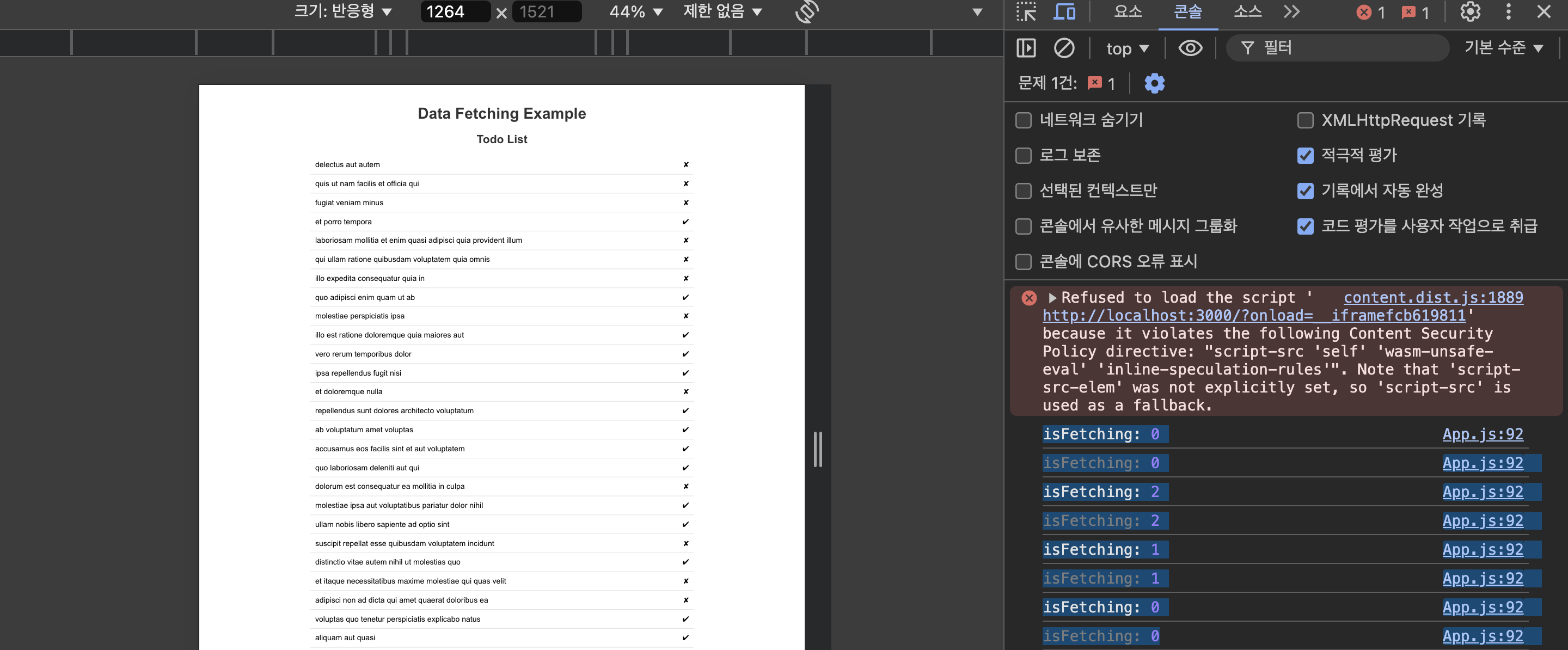
쿼리가 2개일 때에 해당하는 예제 코드. 2개를 fetching 중이다가, 1개를 fetching 중인 것이 반영되는 모습을 확인했다.
✅ API Reference - useIsMutating
useIsMutating은 optional hook으로, 애플리케이션에서 현재 진행중인 ``mutation의 수``를 반환한다. 애플리케이션 전체에서 로딩 인디케이터를 표시하는 데 유용하다.
기본 형태 ✍️
import { useIsMutating } from '@tanstack/react-query'
// How many mutations are fetching?
const isMutating = useIsMutating()
// How many mutations matching the posts prefix are fetching?
const isMutatingPosts = useIsMutating({ mutationKey: ['posts'] })
Options ✍️
1. ``filters``: mutation 필터링하는 데 사용되는 옵션. 원하는 mutation을 선택적으로 필터링할 수 있음.
2. ``queryClient``: queryClient임
Returns ✍️
1. ``isMutating`: 현재 진행중인 `mutation의 수``
예제 코드 ✍️
import React, { useState } from "react";
import axios from "axios";
import { useQueries, useMutation, useIsMutating } from "@tanstack/react-query";
import styled from "styled-components";

// Styled Components
const Container = styled.div`
  font-family: Arial, sans-serif;
  padding: 20px;
  max-width: 800px;
  margin: 0 auto;
`;

const Heading = styled.h1`
  text-align: center;
  color: #333;
`;

const Section = styled.section`
  margin-bottom: 20px;
`;

const TodoList = styled.ul`
  list-style: none;
  padding: 0;
`;

const TodoItem = styled.li`
  padding: 10px;
  border-bottom: 1px solid #ddd;
  display: flex;
  justify-content: space-between;
  align-items: center;
`;

const UserList = styled.ul`
  list-style: none;
  padding: 0;
`;

const UserItem = styled.li`
  padding: 10px;
  border-bottom: 1px solid #ddd;
`;

const LoadingIndicator = styled.div`
  text-align: center;
  font-size: 18px;
  color: #007bff;
  margin-top: 20px;
`;

const AddTodoForm = styled.form`
  margin-top: 20px;
  display: flex;
  justify-content: space-between;
  align-items: center;
`;

const Input = styled.input`
  padding: 10px;
  border: 1px solid #ddd;
  border-radius: 4px;
  width: 80%;
`;

const Button = styled.button`
  padding: 10px 20px;
  border: none;
  background-color: #007bff;
  color: white;
  border-radius: 4px;
  cursor: pointer;
  &:hover {
    background-color: #0056b3;
  }
`;

// Fetch functions
const fetchTodos = async () => {
  const response = await axios.get(
    "https://jsonplaceholder.typicode.com/todos"
  );
  return response.data;
};

const fetchUsers = async () => {
  const response = await axios.get(
    "https://jsonplaceholder.typicode.com/users"
  );
  return response.data;
};

// Mutation functions
const addTodo = async (newTodo) => {
  const response = await axios.post(
    "https://jsonplaceholder.typicode.com/todos",
    newTodo
  );
  return response.data;
};

const addUser = async (newUser) => {
  const response = await axios.post(
    "https://jsonplaceholder.typicode.com/users",
    newUser
  );
  return response.data;
};

const App = () => {
  const [newTodoTitle, setNewTodoTitle] = useState("");
  const [newTodoId, setNewTodoId] = useState(201); // Mock ID for new todos

  const [newUserName, setNewUserName] = useState("");
  const [newUserId, setNewUserId] = useState(11); // Mock ID for new users

  const queries = useQueries({
    queries: [
      {
        queryKey: ["todos"],
        queryFn: fetchTodos,
      },
      {
        queryKey: ["users"],
        queryFn: fetchUsers,
      },
    ],
  });

  const [todosQuery, usersQuery] = queries;

  const addTodoMutation = useMutation({
    mutationFn: addTodo,
    onSuccess: () => {
      // Reset the input field and mock ID
      setNewTodoTitle("");
      setNewTodoId((prevId) => prevId + 1); // Increment mock ID for new todos
    },
    onError: (error) => {
      console.error("Error adding todo:", error);
    },
  });

  const addUserMutation = useMutation({
    mutationFn: addUser,
    onSuccess: () => {
      // Reset the input field and mock ID
      setNewUserName("");
      setNewUserId((prevId) => prevId + 1); // Increment mock ID for new users
    },
    onError: (error) => {
      console.error("Error adding user:", error);
    },
  });

  const isMutating = useIsMutating(["todos", "users"]);

  if (todosQuery.isLoading || usersQuery.isLoading) return <p>Loading...</p>;
  if (todosQuery.isError)
    return <p>Error fetching todos: {todosQuery.error.message}</p>;
  if (usersQuery.isError)
    return <p>Error fetching users: {usersQuery.error.message}</p>;

  const handleAddTodo = (e) => {
    e.preventDefault();
    addTodoMutation.mutate({
      id: newTodoId,
      title: newTodoTitle,
      completed: false,
    });
  };

  const handleAddUser = (e) => {
    e.preventDefault();
    addUserMutation.mutate({ id: newUserId, name: newUserName });
  };

  console.log("isMutating:", isMutating);

  return (
    <Container>
      <Heading>Data Fetching Example</Heading>

      {isMutating > 0 && <LoadingIndicator>Mutating data...</LoadingIndicator>}

      <Section>
        <Heading>Todo List</Heading>
        <TodoList>
          {todosQuery.data.map((todo) => (
            <TodoItem key={todo.id}>
              {todo.title}
              <span>{todo.completed ? "✔" : "✘"}</span>
            </TodoItem>
          ))}
        </TodoList>
      </Section>

      <Section>
        <Heading>User List</Heading>
        <UserList>
          {usersQuery.data.map((user) => (
            <UserItem key={user.id}>{user.name}</UserItem>
          ))}
        </UserList>
      </Section>

      <Section>
        <Heading>Add New Todo</Heading>
        <AddTodoForm onSubmit={handleAddTodo}>
          <Input
            type="text"
            value={newTodoTitle}
            onChange={(e) => setNewTodoTitle(e.target.value)}
            placeholder="Enter todo title"
            required
          />
          <Button type="submit" disabled={addTodoMutation.isLoading}>
            {addTodoMutation.isLoading ? "Adding..." : "Add Todo"}
          </Button>
        </AddTodoForm>
      </Section>

      <Section>
        <Heading>Add New User</Heading>
        <AddTodoForm onSubmit={handleAddUser}>
          <Input
            type="text"
            value={newUserName}
            onChange={(e) => setNewUserName(e.target.value)}
            placeholder="Enter user name"
            required
          />
          <Button type="submit" disabled={addUserMutation.isLoading}>
            {addUserMutation.isLoading ? "Adding..." : "Add User"}
          </Button>
        </AddTodoForm>
      </Section>
    </Container>
  );
};

export default App;
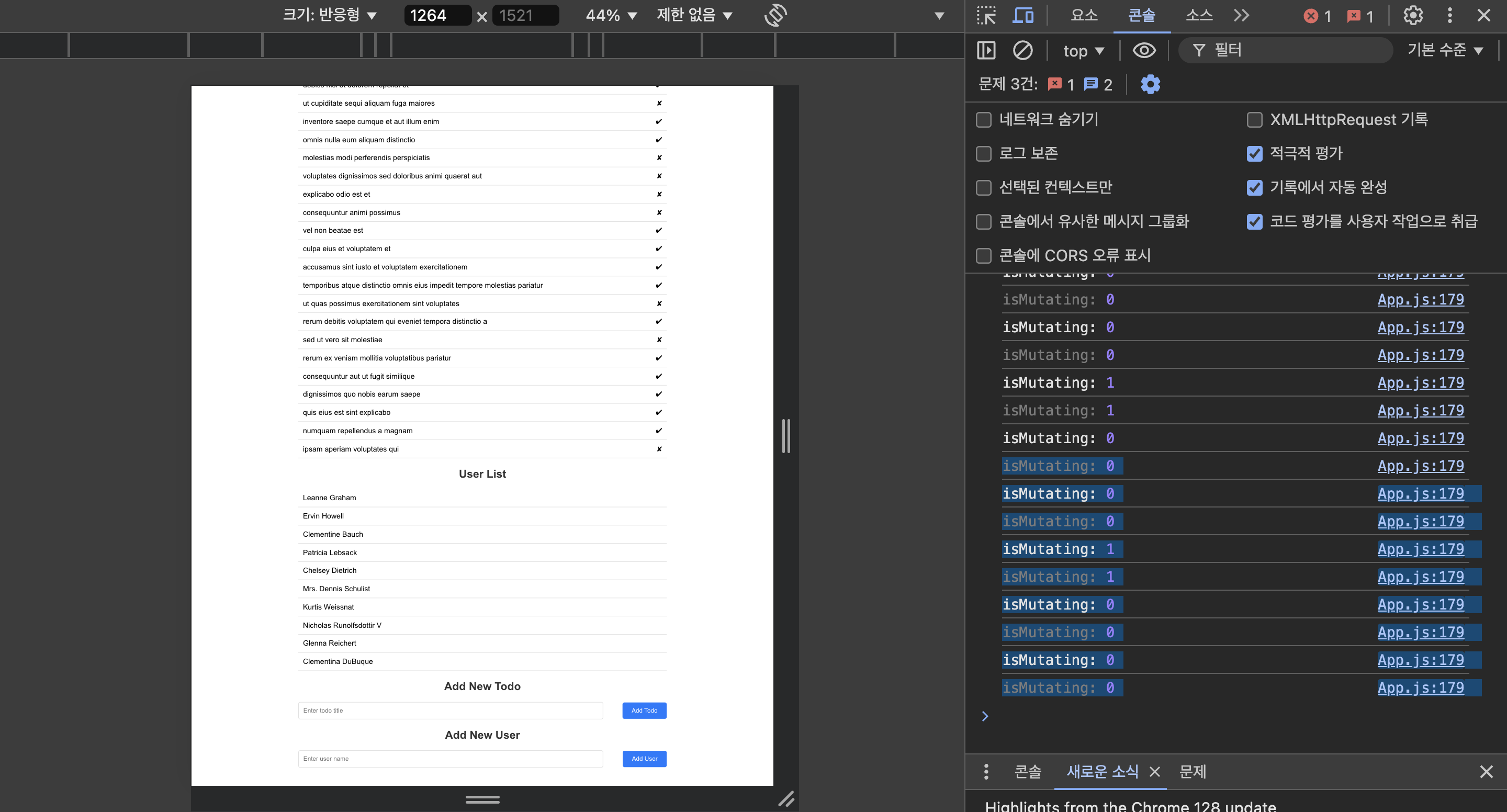
mutating 로깅해봐씀
✅ 회고
김이나 작사가님을 되게 좋아한다. mbti가 같아서 그런가, 도사처럼 툭툭 던지는 이야기들에 크게 공감하게 된다.
20대는 찌질해도 용서받을 수 있는 유일한 때라고 한다. 20대부터 타인의 시선 때문에 다림질을 너무 해놓기 시작하면, 적당하게 무난한 기성품 같은 사람은 될 수 있을지언정, 어딘가에 꼭 필요한 사람이 될 가능성은 낮을 것이라고 주장한다. 나 민관인데 이거 맞다.
쿨해 보이려고 내가 갖고 있는 재료들을 털어낼 필요는 없겠다. 아무도 날 말릴 수 없으셈. 다림질은 30대 때 시작한다.
More to read
프론트엔드와 백엔드 사이
HTTP 상태 코드는 프론트엔드에서 백엔드로 보냈던 요청의 수행 결과를 의미하는 일종의 약속이며, API를 구성하는 핵심 요소 중 하나입니다. 상태 코드와 관련하여, 백엔드는 잘 모르는 프론트엔드의 슬픈 사정이 있습니다.아래는 요청이 실패했음에도, 백엔드에서 상태 코드
JWT토큰 관리 방식 톺아보기
0. 들어가며 🎯 서비스에 접근하려는 사용자가 누구인지 확인하는 과정을 사용자 인증이라고 합니다. 인증된 사용자에게 주어진 권한을 확인하는 작업은 인가라고 부릅니다. 이번 글에서는 인가는 다루지 않습니다. 사용자 인증에는 많은 방식이 있지만, 오늘은 세션 인증 방
A2AA2A / MCP 멀티 에이전트 오케스트레이션
0. 들어가며 ✍️ Google for Developers에, 레스토랑 공급망 시나리오로 엮은 6대 프로토콜(MCP, A2A, UCP, AP2, A2UI, AG-UI)에 대한 가이드가 게시된 이후, MCP와 A2A부터 구현해 보는 것이 좋을 것 같다는 생각이 들었습니