[TIL/React] 2024/09/02
✅ TanStack-Query 사용 이유Fetching Server StateCaching Server StateSynchronizing Server StateUpdating Server State=> 서버 상태의 효율적인 관리를 위해 사용✅ API Reference
✅ TanStack-Query 사용 이유
1. ``Fetching`` Server State 2. ``Caching`` Server State 3. ``Synchronizing`` Server State 4. ``Updating`` Server State
=> ``서버 상태의 효율적인 관리를 위해 사용``
✅ API Reference - useQuery
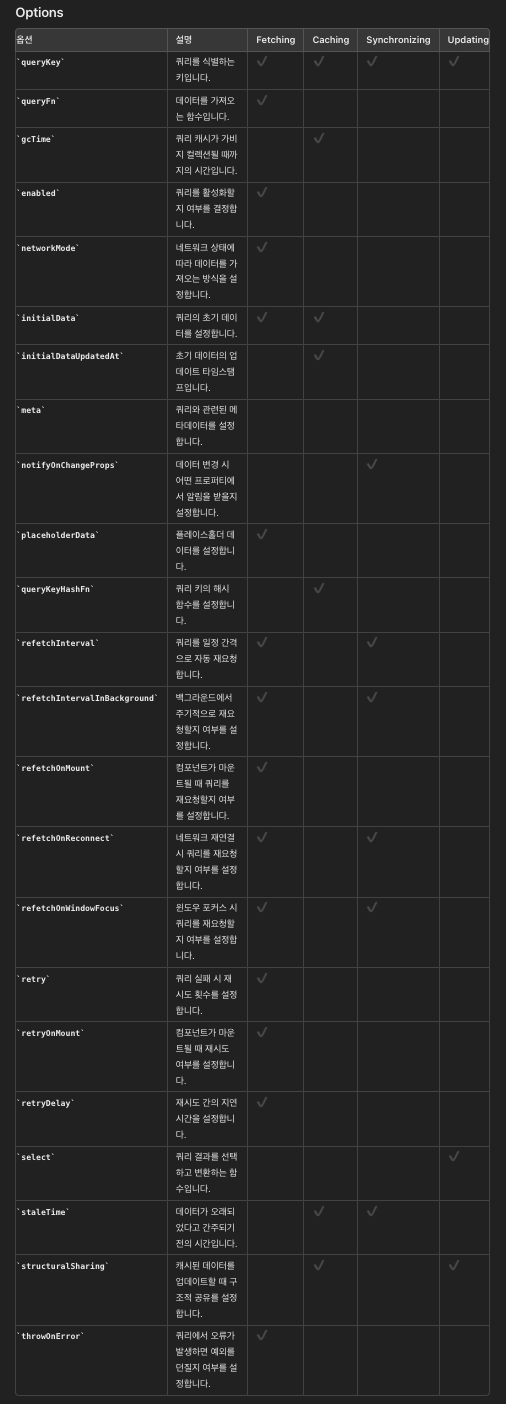
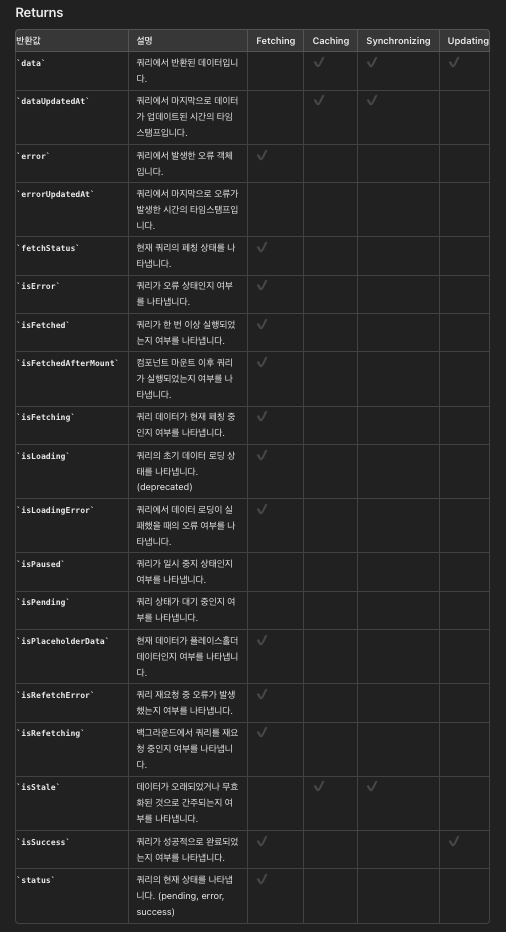
fetching, caching, synchronizing and updating 4가지 주제를 useQuery에서 어떻게 적용하고 있는지 구분지어 봤다.
Options ✍️
Returns ✍️
예제 코드 ✍️
// fetching, caching, synchronizing and updating (server state)
import React from "react";
import { useQuery } from "@tanstack/react-query";
import axios from "axios";

const fetchUsers = async () => {
  const { data } = await axios.get(
    "https://jsonplaceholder.typicode.com/users"
  );
  return data;
};

const App = () => {
  const {
    data,
    dataUpdatedAt,
    error,
    errorUpdatedAt,
    failureCount,
    failureReason,
    fetchStatus,
    isError,
    isFetched,
    isFetchedAfterMount,
    isFetching,
    isInitialLoading,
    isLoading,
    isLoadingError,
    isPaused,
    isPending,
    isPlaceholderData,
    isRefetchError,
    isRefetching,
    isStale,
    isSuccess,
    refetch,
    status,
  } = useQuery({
    // Required Options
    queryKey: ["users"],
    queryFn: fetchUsers,
    enabled: true,
  });

  // 1.data: 기본값 정의 x, 마지막으로 resolve된 data
  console.log("1.Data:", data);
  // 2.dataUpdatedAt: 쿼리가 가장 최근에 '성공' 상태로 반환된 시점의 타임스탬프
  console.log("2.Data Updated At:", dataUpdatedAt);
  // 3.error: 기본값은 null, 오류가 발생한 경우, 쿼리의 오류 객체
  console.log("3.Error:", error);
  // 4.errorUpdatedAt: 쿼리가 가장 최근에 'error' 상태로 반환된 시점의 타임스탬프
  console.log("4.Error Updated At:", errorUpdatedAt);
  // 5.failureCount: 쿼리의 실패 횟수, 쿼리가 실패할 때마다 1씩 증가, 성공하면 0으로 초기화
  console.log("5.Failure Count:", failureCount);
  // 6.failureReason: 쿼리 재시도 실패 원인, 쿼리가 성공하면 null로 초기화
  console.log("6.Failure Reason:", failureReason);
  // 7.fetchStatus: fetching/paused/idle 상태
  // 7-1.fetching: queryFn이 실행 중일 때 true(초기 대기 상태 + 백그라운드에서의 재요청 포함)
  // 7-2.paused: 쿼리가 데이터를 가져오고자 했으나, 현재는 일시 중지된 상태
  // 7-3.idle: 쿼리가 데이터를 가져오고 있지 않은 상태
  console.log("7.Fetch Status:", fetchStatus);
  // 8.isError: status에서 파생된 boolean 값(오류 상태일 때 true 반환)
  console.log("8.Is Error:", isError);
  // 9.isFetched: 쿼리가 단 한 번이라도 성공적으로 fetch 되었다면 true
  console.log("9.Is Fetched:", isFetched);
  // 10.isFetchedAfterMount: component 마운트 후 쿼리가 한 번이라도 성공적으로 fetch 되었다면 true
  // 10-1.이전에 캐시된 데이터를 사용하지 않도록 조건부 렌더링을 할 때 유용하게 사용 가능
  console.log("10.Is Fetched After Mount:", isFetchedAfterMount);
  // 11.isFetching: fetchStatus 상태에 기반하여 데이터가 로딩 중일 때 true를 반환
  console.log("11.Is Fetching:", isFetching);
  // 12.isInitialLoading: 다음 버전에서 제거될 예정, isLoading 구버전 호환성 유지용 별칭
  console.log("12.Is Initial Loading:", isInitialLoading);
  // 13.isLoading: 쿼리에 대한 첫 번째 요청이 진행 중일 때 true를 반환
  // 13-1.(isFetching && isPending)과 동일한 상태라고 볼 수 있음
  console.log("13.Is Loading:", isLoading);
  // 14.isLoadingError: 쿼리의 첫 번째 데이터 로딩 중 오류가 발생했을 때 true로 설정
  // 14-1.즉, 처음 시도에서 데이터 가져오기에 실패했을 때 true를 반환
  console.log("14.Is Loading Error:", isLoadingError);
  // 15.isPaused: fetchStatus 상태에 기반하여, fetchStatus가 paused인 경우 true를 반환
  console.log("15.Is Paused:", isPaused);
  // 16.isPending: status에서 파생된 boolean 값, status가 pending이면 true를 반환
  console.log("16.Is Pending:", isPending);
  // 17.isPlaceholderData: 쿼리에서 실제 데이터 대신 임시로 사용되는 placeholder 데이터를 표시하고 있을 때 true를 반환
  console.log("17.Is Placeholder Data:", isPlaceholderData);
  // 18.isRefetchError: 쿼리의 초기 요청이 아닌, 이후의 재요청 중에 실패한 경우에만 true를 반환
  console.log("18.Is Refetch Error:", isRefetchError);
  // 19.isRefetching: 데이터를 재요청하고 있는 상태일 때 true로 설정
  // 19-1.(isFetching && !isPending)과 동일한 상태라고 볼 수 있음
  console.log("19.Is Refetching:", isRefetching);
  // 20.isStale: 캐시된 데이터가 무효화되었거나, 데이터가 주어진 staleTime보다 오래된 경우 true
  console.log("20.Is Stale:", isStale);
  // 21.isSuccess: status에서 파생된 boolean 값, status가 success면 true를 반환
  console.log("21.Is Success:", isSuccess);
  // 22.refetch: 쿼리를 수동으로 재요청할 때 활용하는 함수
  // 22-1.오류 발생 시 예외를 던지려면 `throwError: true`를 설정하고, 진행 중인 요청을 취소하려면 `cancelRefetch: false`로 설정 가능
  console.log("22.Refetch:", refetch);
  // 23.status(pending/error/success)
  // 23-1.pending: 캐시된 데이터가 없고 쿼리 시도가 아직 완료되지 않은 상태
  // 23-2.error: 쿼리 시도가 오류로 끝났을 때
  // 23-3-1.success: 쿼리가 오류 없이 응답을 받았으며 데이터를 표시할 준비가 된 상태
  // 23-3-2.success: enabled 속성이 false로 설정되어 있는 경우, initialData가 표시됨
  console.log("23.Status:", status);

  if (isLoading) return <div>Loading...</div>;
  if (isError) return <div>An error occurred: {error.message}</div>;

  return (
    <div>
      <h1>Users</h1>
      <ul>
        {data.map((user) => (
          <li key={user.id}>
            {user.name} ({user.email})
          </li>
        ))}
      </ul>
    </div>
  );
};

export default App;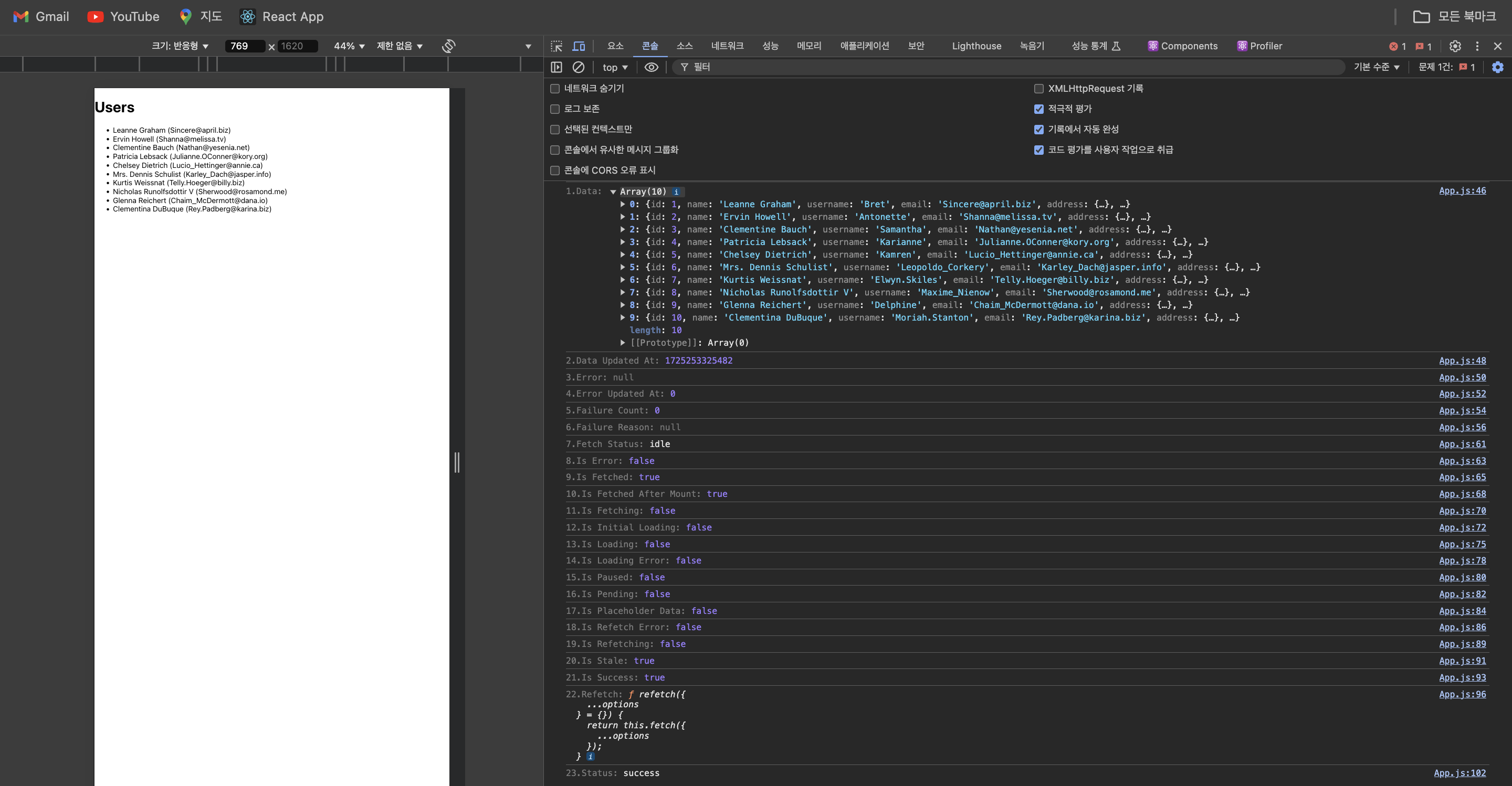
More to read
프론트엔드와 백엔드 사이
HTTP 상태 코드는 프론트엔드에서 백엔드로 보냈던 요청의 수행 결과를 의미하는 일종의 약속이며, API를 구성하는 핵심 요소 중 하나입니다. 상태 코드와 관련하여, 백엔드는 잘 모르는 프론트엔드의 슬픈 사정이 있습니다.아래는 요청이 실패했음에도, 백엔드에서 상태 코드
JWT토큰 관리 방식 톺아보기
0. 들어가며 🎯 서비스에 접근하려는 사용자가 누구인지 확인하는 과정을 사용자 인증이라고 합니다. 인증된 사용자에게 주어진 권한을 확인하는 작업은 인가라고 부릅니다. 이번 글에서는 인가는 다루지 않습니다. 사용자 인증에는 많은 방식이 있지만, 오늘은 세션 인증 방
A2AA2A / MCP 멀티 에이전트 오케스트레이션
0. 들어가며 ✍️ Google for Developers에, 레스토랑 공급망 시나리오로 엮은 6대 프로토콜(MCP, A2A, UCP, AP2, A2UI, AG-UI)에 대한 가이드가 게시된 이후, MCP와 A2A부터 구현해 보는 것이 좋을 것 같다는 생각이 들었습니