React
[TIL/React] 2023/08/09
파일 구조 변경 🟠프로젝트에 sidebar 적용 🟠회원가입 🟠지금까지 🟠회고 🟢10%도 완성되지 않았는데 엄마가 되게 좋아한다. 그럼 대작이지 뭐,,, 내일은 딥다이브 좀 읽어야겠다. 진행시켜!
2023년 8월 9일3min read
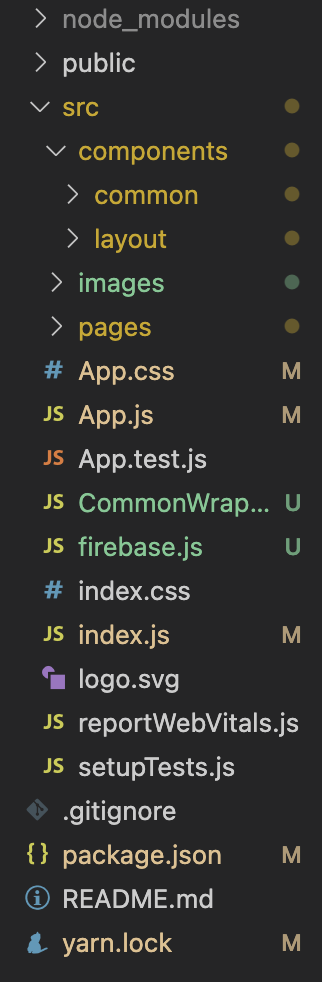
파일 구조 변경 🟠
프로젝트에 sidebar 적용 🟠
code
import React from "react";
import styled from "styled-components";
import { SidebarData } from "./SidebarData";
import IconButton from "@mui/material/IconButton";
import CloseIcon from "@mui/icons-material/Close";

const SidebarContainer = styled.div`
  height: 100vh;
  max-width: 900px;
  width: ${({ open1 }) => (open1 ? "900px" : "0")};
  background-color: black;
  position: fixed;
  top: 0;
  right: 0;
  transition: 0.7s;
  overflow-x: hidden;
`;

const CloseSidebarButton = styled.button`
  background-color: transparent;
  border: none;
  color: white;
  cursor: pointer;
  padding: 8px;
  position: absolute;
  top: 0;
  right: 0;
`;

const SidebarList = styled.ul`
  height: auto;
  padding: 0;
  width: 100%;
  margin-top: 60px;
`;

const SidebarItem = styled.li`
  width: 100%;
  height: 80px;
  list-style-type: none;
  margin: 0;
  display: flex;
  flex-direction: row;
  color: white;
  justify-content: center;
  font-weight: bolder;
  align-items: center;
  font-family: "Trebuchet MS", "Lucida Sans Unicode", "Lucida Grande",
    "Lucida Sans", Arial, sans-serif;
  &:hover {
    cursor: pointer;
    background-color: #293846;
  }
  ${({ active }) =>
    active &&
    `
    background-color: #293846;
  `}
`;

const Sidebar = ({ open, onClose }) => {
  const handleLinkClick = (link) => {
    window.location.pathname = link;
  };

  return (
    <SidebarContainer open1={open}>
      <CloseSidebarButton onClick={onClose}>
        <IconButton>
          <CloseIcon style={{ color: "white" }} fontSize={"large"} />
        </IconButton>
      </CloseSidebarButton>
      <SidebarList>
        {SidebarData?.map((val, key) => {
          return (
            <SidebarItem
              key={key}
              active={window.location.pathname === val.link}
              onClick={() => handleLinkClick(val.link)}
            >
              {val.title}
            </SidebarItem>
          );
        })}
      </SidebarList>
    </SidebarContainer>
  );
};

export default Sidebar;
회원가입 🟠
code
import { createUserWithEmailAndPassword } from "firebase/auth";
import React, { useState } from "react";
import styled from "@emotion/styled";
import { auth } from "../firebase";
import { useNavigate } from "react-router-dom";

const SignUpTitle = styled.p`
  text-align: center;
  margin: 100px;
  font-weight: bolder;
  font-size: 40px;
`;

const SignUpFormWrapper = styled.div`
  display: flex;
  flex-direction: column;
  justify-content: center;
  max-width: 400px;
  height: 500px;
  margin: 0 auto;
`;

const FormLabel = styled.label`
  font-size: 16px;
  margin-bottom: 8px;
`;

const FormInput = styled.input`
  padding: 20px;
  margin-bottom: 16px;
  border: 1px solid #ccc;
  border-radius: 8px;
  font-size: 16px;
`;

const SubmitButton = styled.button`
  background-color: black;
  color: #fff;
  padding: 20px;
  border: none;
  border-radius: 8px;
  font-size: 18px;
  font-weight: bolder;
  cursor: pointer;
  &:hover {
    background-color: #fff;
    color: black;
    border: 2px solid black;
  }
`;

const TermsWrapper = styled.div`
  margin-top: 100px;
  text-align: center;
`;

const TermsLink = styled.a`
  color: blue;
  text-decoration: underline;
  cursor: pointer;
`;

const SignUpPage = () => {
  const [email, setEmail] = useState("");
  const [password, setPassword] = useState("");
  const navigate = useNavigate();

  const goToLogin = () => {
    navigate("/login");
  };
  const goToTerms = () => {
    navigate("/terms");
  };

  const signUp = (e) => {
    e.preventDefault();
    createUserWithEmailAndPassword(auth, email, password)
      .then((userCredential) => {
        console.log(userCredential);
      })
      .catch((error) => {
        console.log(error);
      });
  };

  return (
    <div style={{ height: "1000px" }}>
      <form onSubmit={signUp}>
        <SignUpTitle>회원가입</SignUpTitle>
        <SignUpFormWrapper>
          <h2>이메일로 회원가입</h2>

          <FormLabel>Email</FormLabel>
          <FormInput
            type="email"
            placeholder="이메일 주소를 입력하세요"
            value={email}
            onChange={(e) => setEmail(e.target.value)}
          />

          <FormLabel>Password</FormLabel>
          <FormInput
            type="password"
            placeholder="비밀번호를 입력하세요"
            value={password}
            onChange={(e) => setPassword(e.target.value)}
          />

          <SubmitButton>회원가입</SubmitButton>

          <div style={{ display: "flex", columnGap: "8px" }}>
            <p style={{ fontWeight: "bolder" }}>이미 회원이신가요?</p>
            <p
              style={{ color: "red", fontWeight: "bolder", cursor: "pointer" }}
              onClick={goToLogin}
            >
              로그인하기
            </p>
          </div>
          <TermsWrapper>
            회원가입을 진행함으로써
            <br />
            <TermsLink onClick={goToTerms} target="_blank">
              이용약관
            </TermsLink>
            에 동의하신 것으로 간주합니다.
          </TermsWrapper>
        </SignUpFormWrapper>
      </form>
    </div>
  );
};

export default SignUpPage;
지금까지 🟠

회고 🟢
10%도 완성되지 않았는데 엄마가 되게 좋아한다. 그럼 대작이지 뭐,,, 내일은 딥다이브 좀 읽어야겠다. 진행시켜!
More to read
REST API
프론트엔드와 백엔드 사이
HTTP 상태 코드는 프론트엔드에서 백엔드로 보냈던 요청의 수행 결과를 의미하는 일종의 약속이며, API를 구성하는 핵심 요소 중 하나입니다. 상태 코드와 관련하여, 백엔드는 잘 모르는 프론트엔드의 슬픈 사정이 있습니다.아래는 요청이 실패했음에도, 백엔드에서 상태 코드
JWT토큰 관리 방식 톺아보기
0. 들어가며 🎯 서비스에 접근하려는 사용자가 누구인지 확인하는 과정을 사용자 인증이라고 합니다. 인증된 사용자에게 주어진 권한을 확인하는 작업은 인가라고 부릅니다. 이번 글에서는 인가는 다루지 않습니다. 사용자 인증에는 많은 방식이 있지만, 오늘은 세션 인증 방
A2AA2A / MCP 멀티 에이전트 오케스트레이션
0. 들어가며 ✍️ Google for Developers에, 레스토랑 공급망 시나리오로 엮은 6대 프로토콜(MCP, A2A, UCP, AP2, A2UI, AG-UI)에 대한 가이드가 게시된 이후, MCP와 A2A부터 구현해 보는 것이 좋을 것 같다는 생각이 들었습니