[TIL/React] 2023/07/01
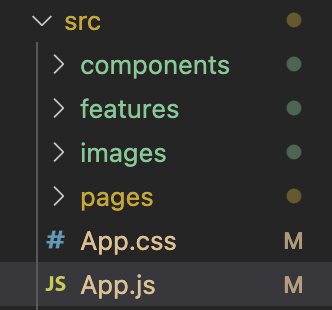
파일 구조App.js최상단인 App.js에서는 Homepage 컴포넌트만을 보여줌src/pages/Homepage.jshomepage는 크게 1)AppBar, 2)Common, 3)Footer 로 구성src/components/appbar/AppBar.jsAppBar
파일 구조
App.js
import React from "react";
import HomePage from "./pages/HomePage";

function App() {
  return (
    <>
      <HomePage />
    </>
  );
}

export default App;
최상단인 App.js에서는 Homepage 컴포넌트만을 보여줌
src/pages/Homepage.js
import React, { useRef } from "react";
import AppBar from "../components/appbar/AppBar";
import Footer from "../components/footer/Footer";
import Common from "../components/common/Common";
import HomeComponent from "../components/HomeComponent";
import AddTaskComponent from "../components/AddTaskComponent";
import RecentTodoComponent from "../components/RecentTodoComponent";
import MyTodoComponent from "../components/MyTodoComponent";

const HomePage = () => {
  const homeRef = useRef(null);
  const addRef = useRef(null);
  const recentRef = useRef(null);
  const myRef = useRef(null);

  const handleScroll = (ref) => {
    ref.current.scrollIntoView({ behavior: "smooth" });
  };

  return (
    <div style={{ display: "flex", flexDirection: "column" }}>
      <AppBar
        handleHomeClick={() => handleScroll(homeRef)}
        handleAddClick={() => handleScroll(addRef)}
        handleRecentClick={() => handleScroll(recentRef)}
        handleMyClick={() => handleScroll(myRef)}
      />

      <Common>
        <HomeComponent ref={homeRef} />
        <AddTaskComponent ref={addRef} />
        <RecentTodoComponent ref={recentRef} />
        <MyTodoComponent ref={myRef} />
      </Common>

      <Footer />
    </div>
  );
};

export default HomePage;
homepage는 크게 1)AppBar, 2)Common, 3)Footer 로 구성
src/components/appbar/AppBar.js
import React, { useEffect } from "react";
import { useDispatch, useSelector } from "react-redux";
import { styled } from "styled-components";
import { getTodo } from "../../features/todosSlice";
import { HiChevronDoubleRight } from "react-icons/hi";
import { logo } from "../../images";

const Header = styled.div`
  background-color: #c07848;
  width: 100%;
  height: 10vh;
  position: sticky;
  top: 0;
  z-index: 999;
`;

const HeaderWrapper = styled.div`
  max-width: 1200px;
  display: flex;
  margin: 0 auto;
  height: 100%;
  /* background-color: red; */
  padding: 0px 12px;
  @media (max-width: 900px) {
    display: none;
  }
`;

const LogoContainer = styled.div`
  width: auto;
  height: 100px;
  display: flex;
  justify-content: center;
  align-items: center;
  margin-right: 40px;
`;
const Logo = styled.img`
  width: auto;
  height: 80px;
`;

const NavButtonContainer = styled.div`
  display: flex;
  align-items: center;
  column-gap: 40px;
`;

const NavButton = styled.button``;

const HamburgerIconContainer = styled.div`
  display: flex;
  align-items: center;
  justify-content: flex-end;
  flex-grow: 1;
`;

const AppBar = ({
  handleHomeClick,
  handleAddClick,
  handleRecentClick,
  handleMyClick,
}) => {
  const { loading } = useSelector((state) => state.todos);
  const dispatch = useDispatch();

  useEffect(() => {
    dispatch(getTodo());
  }, []);

  if (loading) {
    return <p>로딩중</p>;
  }

  return (
    <div>
      <Header>
        <HeaderWrapper>
          <LogoContainer>
            <Logo src={logo} />
          </LogoContainer>
          <NavButtonContainer>
            <button onClick={handleHomeClick}>Home</button>
            <button onClick={handleAddClick}>AddTask</button>
            <button onClick={handleRecentClick}>RecentTodo</button>
            <button onClick={handleMyClick}>MyTodo</button>
          </NavButtonContainer>
          <HamburgerIconContainer>
            <HiChevronDoubleRight />
          </HamburgerIconContainer>
        </HeaderWrapper>
      </Header>
    </div>
  );
};

export default AppBar;
AppBar 컴포넌트는 크게 1)Logo, 2)NavButton, 3)Hamburger icon 으로 구성
미디어 쿼리를 사용하여 화면이 900px 이하로 줄어들면 AppBar에 관한 내용이 나오지 않도록 시도해봄
src/components/common/Common.js
import React from "react";
import { styled } from "styled-components";

const Content = styled.div`
  height: 100vh;
  display: flex;
  flex-direction: column;
`;

const Common = ({ children }) => {
  return <Content style={{ flexGrow: 1 }}>{children}</Content>;
};

export default Common;
Common으로 감싸진 컴포넌트들
HomeComponent
import React from "react";
import { styled } from "styled-components";
import { forwardRef } from "react";

const HomeComponentWrapper = styled.div`
  background-color: black;
  min-height: 100%;
`;

const HomeComponent = forwardRef((props, ref) => {
  return <HomeComponentWrapper ref={ref}>gd</HomeComponentWrapper>;
});

export default HomeComponent;
AddTaskComponent
import React from "react";
import { styled } from "styled-components";
import { forwardRef } from "react";

const AddTaskComponentWrapper = styled.div`
  background-color: gray;
  min-height: 100%;
`;

const AddTaskComponent = forwardRef((props, ref) => {
  return <AddTaskComponentWrapper ref={ref}>gd</AddTaskComponentWrapper>;
});

export default AddTaskComponent;
RecentTodoComponent
import React from "react";
import { styled } from "styled-components";
import { forwardRef } from "react";
const RecentTodoComponentWrapper = styled.div`
  background-color: black;
  min-height: 100%;
`;

const RecentTodoComponent = forwardRef((props, ref) => {
  return <RecentTodoComponentWrapper ref={ref}>gd</RecentTodoComponentWrapper>;
});

export default RecentTodoComponent;
MyTodoComponent
import React, { forwardRef } from "react";
import { styled } from "styled-components";

const MyTodoComponentWrapper = styled.div`
  background-color: gray;
  min-height: 100%;
`;

const MyTodoComponent = forwardRef((props, ref) => {
  return (
    <MyTodoComponentWrapper ref={ref}>내 할 일 컴포넌트</MyTodoComponentWrapper>
  );
});

export default MyTodoComponent;
src/components/footer/Footer.js
import React from "react";
import { styled } from "styled-components";

const FooterWrapper = styled.div`
  background-color: #fff;
  display: flex;
  height: 20vh;
  width: 100%;
  justify-content: space-around;
  margin: 0 auto;
`;

const FooterTextContainer = styled.div`
  display: flex;
  justify-content: center;
  align-items: center;
  flex-direction: column;
`;

const NavButtonContainer = styled.div`
  display: flex;
  align-items: center;
  column-gap: 40px;
`;

const Footer = () => {
  return (
    <div>
      <FooterWrapper>
        <FooterTextContainer>
          <p>My task</p>
          <p>Copyright © 2023 All rights reserved</p>
          <p>Powered By SITE123 - Create your own website</p>
        </FooterTextContainer>
        <NavButtonContainer>
          <button>Home</button>
          <button>AddTask</button>
          <button>RecentTodo</button>
          <button>MyTodo</button>
        </NavButtonContainer>
      </FooterWrapper>
    </div>
  );
};

export default Footer;
문제점
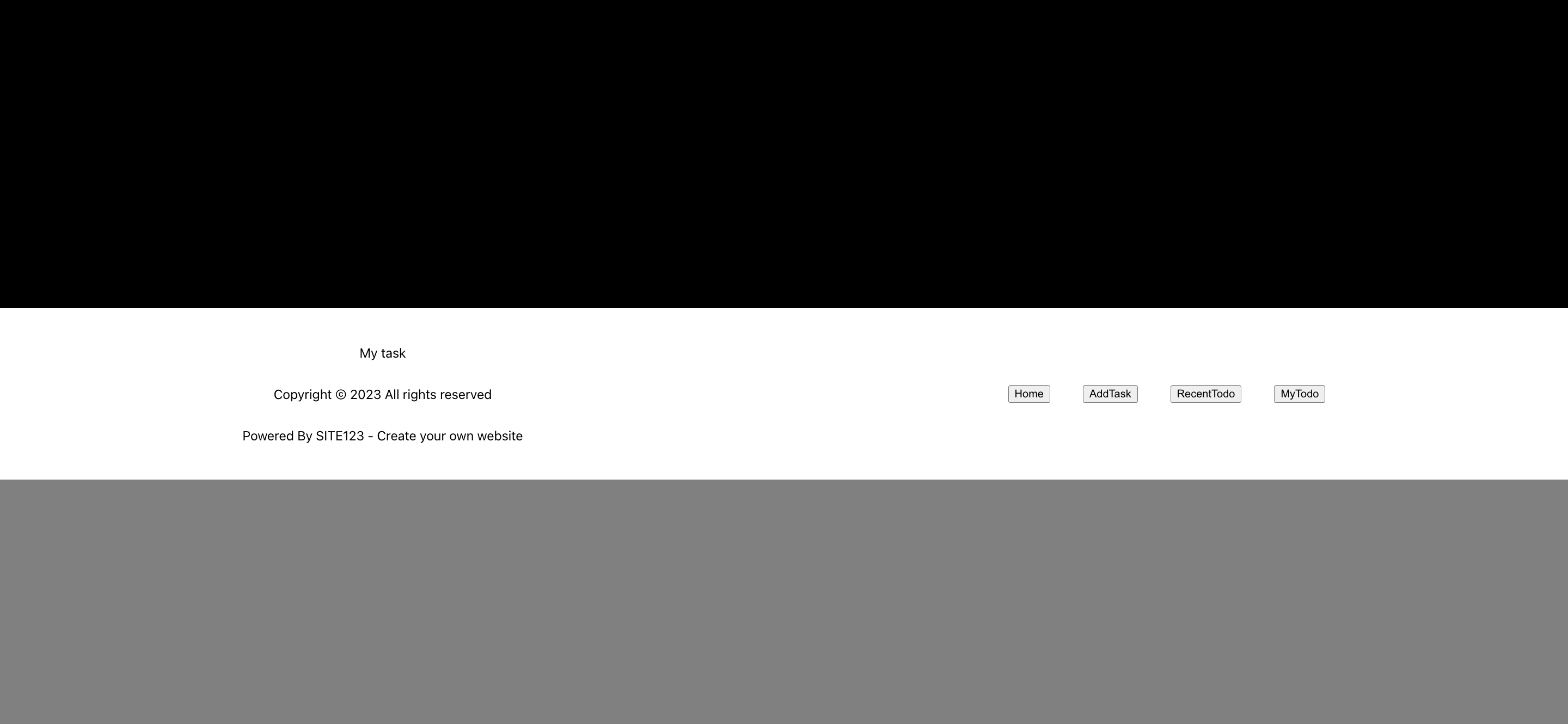
footer가 컴포넌트 사이에 끼어있음
More to read
프론트엔드와 백엔드 사이
HTTP 상태 코드는 프론트엔드에서 백엔드로 보냈던 요청의 수행 결과를 의미하는 일종의 약속이며, API를 구성하는 핵심 요소 중 하나입니다. 상태 코드와 관련하여, 백엔드는 잘 모르는 프론트엔드의 슬픈 사정이 있습니다.아래는 요청이 실패했음에도, 백엔드에서 상태 코드
JWT토큰 관리 방식 톺아보기
0. 들어가며 🎯 서비스에 접근하려는 사용자가 누구인지 확인하는 과정을 사용자 인증이라고 합니다. 인증된 사용자에게 주어진 권한을 확인하는 작업은 인가라고 부릅니다. 이번 글에서는 인가는 다루지 않습니다. 사용자 인증에는 많은 방식이 있지만, 오늘은 세션 인증 방
A2AA2A / MCP 멀티 에이전트 오케스트레이션
0. 들어가며 ✍️ Google for Developers에, 레스토랑 공급망 시나리오로 엮은 6대 프로토콜(MCP, A2A, UCP, AP2, A2UI, AG-UI)에 대한 가이드가 게시된 이후, MCP와 A2A부터 구현해 보는 것이 좋을 것 같다는 생각이 들었습니